AI vocal remover · Demucs v4 on cloud GPUs
Vocal Remover: Get the Instrumental and the Acapella From Any Song
Demucs.net is an AI vocal remover built on Demucs v4, the open-source music source separation model from Meta AI Research. Upload a song and the vocal remover gives you two files: the instrumental without the vocal, and the vocal on its own. No install, no GPU of your own.
30 free credits every month · No card needed · Uploads auto-deleted
30 free credits every month · No card needed · Uploads auto-deleted
Hear the AI Vocal Remover on a Real Song
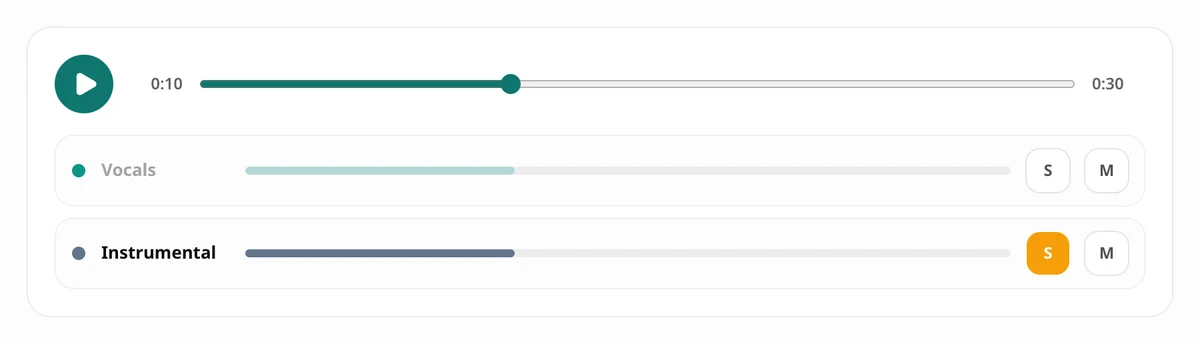
This is a real result from our AI vocal remover: a Creative Commons song split into the vocal and the instrumental with the standard Demucs v4 model. Press play, then solo the instrumental to hear the song with the vocal removed, or solo the vocal to hear the acapella.
- Vocals
- Instrumental
How to Remove Vocals From a Song
1. Upload Your Song
Drop in an MP3, WAV, FLAC, M4A, AAC or OGG file. On a free account the AI vocal remover takes songs up to 6 minutes and 50 MB; paid plans allow 15 minutes and 200 MB.
2. Keep Two Stems Selected
The vocal remover opens in two-stem mode: vocal and instrumental. Choose Best quality for the cleanest vocal, and see the credit cost before you start.
3. Preview, Then Download
Solo the instrumental or the vocal in the player, then download both as 320 kbps MP3 files, one by one or as a ZIP.
One Run, Two Files: Instrumental and Acapella
The Instrumental (Karaoke Track)
Everything except the vocal: drums, bass, guitars, keys and the rest of the band, summed into one track. Use it for karaoke, covers, practice or a backing track.
The Acapella (Isolated Vocal)
The vocal on its own, lead and backing parts together, with its breaths and reverb tails. Use it for remixes, DJ sets or to study a singer's phrasing. An AI vocal remover and a vocal isolator are the same tool: one split gives you both halves.
Why an AI Vocal Remover Beats the Old Trick
The classic vocal remover trick flips one stereo channel and adds it to the other, which cancels whatever sits in the centre of the mix. The vocal is usually there, but so are the kick drum, the snare and the bass, so they vanish too, while any vocal reverb spread across the stereo field stays behind.
An AI vocal remover does not care where the vocal sits. Demucs v4 has learned what a voice sounds like and rebuilds the vocal and the instrumental as separate tracks, reading the song both as a waveform and as a spectrogram. On the MUSDB18-HQ benchmark its fine-tuned model scores 9.0 dB of signal-to-distortion ratio, against 5.9 dB for Spleeter.
Standard or Best Quality for Vocal Removal?
Both models are Demucs v4. Times and credits are for a 4-minute song in two-stem mode.
| Model | Time | Cost | Best for |
|---|---|---|---|
| Standard (htdemucs) | about 20 seconds | 3 credits | Karaoke tracks and quick tests |
| Best quality (htdemucs_ft) | about 32 seconds | 5 credits | Acapellas for remixes and releases |
Times were measured with four stems on our cloud GPUs in September 2026; two-stem jobs finish a little faster. The first job after a quiet spell can take up to a minute longer while the model warms up.
What People Use an AI Vocal Remover For
Karaoke and Singing Practice
Remove the vocal from a favourite song and sing over the real backing track instead of a MIDI cover.
Covers and Play-Alongs
Record your own vocal over the original band, or practise an instrument along with the song minus the singer.
Acapellas for Remixes and DJ Sets
Start a remix, a mashup or a live edit from the isolated vocal the AI vocal remover gives you.
Lyrics and Melody Transcription
Solo the vocal track to hear every word and note clearly, with no band in the way.
Tips for the Cleanest Vocal Removal
- Upload the best source you have. A WAV, a FLAC or a 320 kbps MP3 gives the AI vocal remover more detail than a low-bitrate rip.
- Use Best quality when the vocal matters, such as an acapella you plan to use in a released remix.
- If you also want the drums or the bass on their own, use four stems in the stem splitter instead: the vocal comes out the same, and you get every part.
- Check the instrumental on headphones before you download; faint vocal traces show up there first.
Limits Worth Knowing
- Lead and backing vocals stay together. The AI vocal remover cannot take out only the lead vocal and keep the harmonies.
- Heavy reverb, distortion or pitch correction on a vocal can leave faint traces in the instrumental.
- Old mono recordings separate less cleanly than stereo mixes.
- The model is trained on music. It often pulls a voice out of background music, but speech is not what it was built for.
Vocal Remover FAQ
Is this AI vocal remover free?
Yes, to start. Every account gets 30 free credits a month once you sign in with Google or confirm your email. Removing the vocal from a 4-minute song costs 3 credits, so that covers about ten songs. No card is needed.
Can I remove the lead vocal but keep the backing vocals?
No. Demucs puts every voice in the same vocal stem, so the lead vocal and the harmonies come out together, and the instrumental has no backing vocals either.
What files do I get?
Two 320 kbps MP3 files: the vocal and the instrumental. Download them one by one or as a ZIP.
How long does vocal removal take?
Processing a 4-minute song takes about 20 to 30 seconds on our GPUs, plus the upload and any queue. The first job after a quiet spell can take up to a minute longer.
Is an AI vocal remover the same as a vocal isolator?
Yes. One two-stem split gives you both halves: the instrumental with the vocal removed, and the isolated vocal track.
Is it legal to remove vocals from a song?
Only upload audio you have the right to process. Removing the vocal does not give you new rights to a song: publishing an instrumental, a cover or a remix made from someone else's recording needs their permission. Our terms of service and acceptable use policy set out the rules.
Is my song private?
Yes. Your upload is used only to make your two files and is deleted as soon as the split finishes. The results are kept for 24 hours on the free plan and 7 days on paid plans. Nobody listens to your audio, and it is never used for training.
Does the vocal remover work on speech or podcasts?
Often, but the AI vocal remover is trained on music. A single voice over background music usually separates well; noisy recordings and several overlapping speakers vary.
Can I paste a YouTube link?
No. The AI vocal remover only works on files you upload, and you need the right to process them.
Remove the Vocal From Your First Song Free
Upload a song and hear what the Demucs v4 AI vocal remover can do. 30 free credits every month, no card needed.
Remove Vocals FreeNeed the drums, bass or guitar too? Try the stem splitter.